Modern devices rely heavily on their charge ports to maintain power and functionality. Whether you’re dealing with a smartphone, laptop, or electric vehicle, understanding your device’s charging interface is crucial for optimal performance and longevity. This comprehensive guide explores the intricate world of charging ports, helping you identify, troubleshoot, and maintain these essential components.
What is a Charge Port and Why Does It Matter?
A charge port serves as the physical interface between your device and its power source. This critical component allows electrical current to flow from an external charger into your device’s battery system. Without a properly functioning charging port, even the most advanced device becomes nothing more than an expensive paperweight once its battery depletes.
The importance of charge ports extends beyond simple power delivery. These interfaces often support data transfer, video output, and various communication protocols. Understanding how your device’s charging port works can help you make informed decisions about accessories, troubleshoot problems effectively, and extend your device’s lifespan significantly.
Common Charge Port Types Across Different Devices
USB-A Charge Ports
USB-A connectors represent one of the oldest and most recognizable charge port designs in modern technology. These rectangular ports feature a flat, wide design that only fits one way, preventing incorrect insertion. USB-A ports typically deliver 5 volts of power and can handle data transfer speeds up to 480 Mbps with USB 2.0 or up to 5 Gbps with USB 3.0.
Despite being gradually phased out in favor of newer connector types, USB-A charge ports remain prevalent in older devices, computers, and charging accessories. Their robust design and universal compatibility have made them a staple in the technology industry for over two decades. However, their larger size and slower charging capabilities have led many manufacturers to adopt more advanced connector types.
USB-C Charge Ports
USB-C represents the future of charge port technology, offering unprecedented versatility and performance in a compact, reversible design. These oval-shaped connectors can deliver up to 100 watts of power, support data transfer speeds up to 40 Gbps, and handle video output up to 8K resolution. The reversible design eliminates the frustration of incorrect insertion attempts that plagued earlier USB standards.
The adoption of USB-C charging ports has accelerated across industries, from smartphones and laptops to gaming consoles and electric vehicles. This universal standard promises to reduce cable clutter and simplify the charging experience for consumers. Major manufacturers like Apple, Samsung, and Dell have committed to USB-C as their primary connector type for future devices.
Lightning Charge Ports
Apple’s proprietary Lightning charge port design debuted in 2012 as a replacement for the older 30-pin dock connector. This compact, 8-pin connector features a reversible design and can handle power delivery up to 12 watts for most devices. Lightning ports support data transfer speeds up to 480 Mbps and can output video signals through appropriate adapters.
While Lightning charging ports offer excellent durability and compact design, their proprietary nature limits compatibility with non-Apple devices. The European Union’s mandate requiring USB-C adoption by 2024 has prompted Apple to transition newer devices to this universal standard, though Lightning ports remain common in existing Apple products.
Micro-USB Charge Ports
Micro-USB connectors dominated the smartphone market for nearly a decade before USB-C adoption became widespread. These small, trapezoidal charge ports typically deliver 5 volts of power and support data transfer speeds up to 480 Mbps. Their compact size made them ideal for mobile devices, though their asymmetrical design often led to insertion difficulties.
Suggested read: Charge Air Cooler System: Enhancing Engine Performance and Efficiency
Many budget smartphones, fitness trackers, and accessories still utilize Micro-USB charging ports due to their cost-effectiveness and established manufacturing infrastructure. However, their slower charging speeds and fragile connector design have made them less desirable for premium devices and power-hungry applications.
Specialized Charge Port Applications
Electric Vehicle Charge Ports
Electric vehicle charge ports represent a completely different category of charging infrastructure, designed to handle significantly higher power levels than consumer electronics. These specialized connectors must safely deliver anywhere from 3.3 kW for Level 1 charging up to 350 kW for ultra-fast DC charging systems.
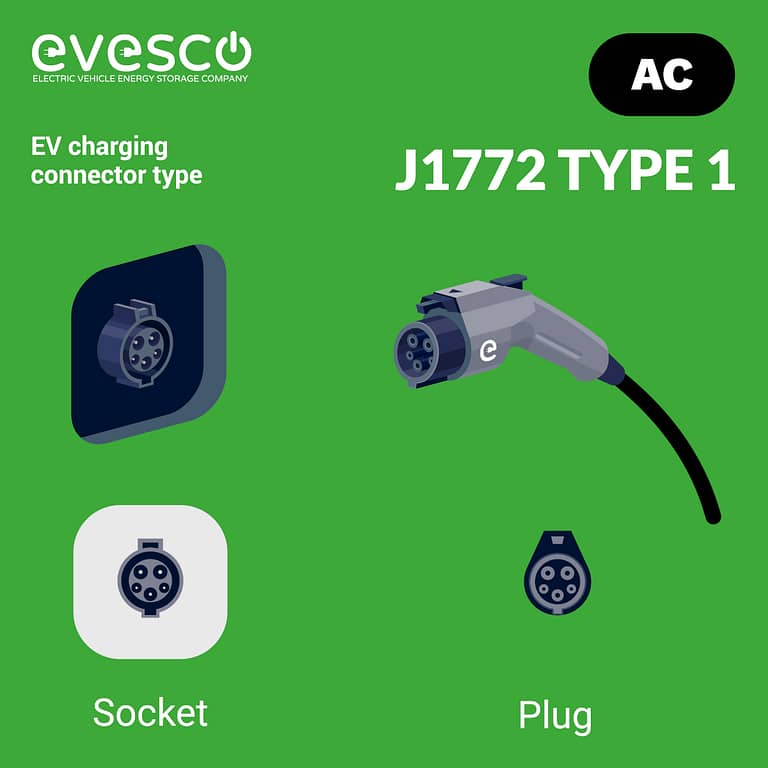
The most common electric vehicle charging port types include Type 1 (SAE J1772) for North American markets, Type 2 (Mennekes) for European markets, and CHAdeMO or CCS (Combined Charging System) for fast DC charging. Each connector type features specific safety mechanisms, cooling systems, and communication protocols to ensure safe and efficient power transfer.
Table: Electric Vehicle Charge Port Comparison
| Connector Type | Power Rating | Charging Speed | Market Region |
|---|---|---|---|
| Type 1 (J1772) | Up to 19.2 kW | 4-8 hours | North America |
| Type 2 (Mennekes) | Up to 43 kW | 1-6 hours | Europe |
| CHAdeMO | Up to 62.5 kW | 20-40 minutes | Japan/Global |
| CCS Combo | Up to 350 kW | 10-30 minutes | Global |
Laptop Charge Ports
Laptop charge ports have evolved significantly from proprietary barrel connectors to more standardized solutions. Traditional barrel connectors featured circular designs with specific voltage and amperage requirements unique to each manufacturer and model. This approach created compatibility nightmares for consumers and increased electronic waste.
Modern laptops increasingly adopt USB-C charging ports for their power delivery capabilities and universal compatibility. These implementations can handle power delivery up to 100 watts, sufficient for most ultrabooks and many gaming laptops. Some high-performance laptops still require proprietary connectors to handle power requirements exceeding USB-C specifications.
Troubleshooting Common Charge Port Issues
Physical Damage and Wear
Charge port damage often manifests as loose connections, intermittent charging, or complete failure to recognize charging cables. Physical damage can result from repeated insertion and removal cycles, foreign object insertion, or impact damage. Inspection with proper lighting and magnification can reveal bent pins, debris accumulation, or connector wear.
Preventive maintenance for your charging port includes gentle cable insertion, regular cleaning with compressed air, and avoiding excessive force during connection attempts. Professional repair services can often restore functionality to damaged ports through pin straightening, debris removal, or complete connector replacement.
Software and Firmware Problems
Sometimes charge port issues stem from software problems rather than hardware failure. Outdated device drivers, corrupted charging protocols, or firmware bugs can prevent proper charging recognition. These issues often appear suddenly after software updates or when using new charging accessories.
Resolving software-related charging port problems typically involves driver updates, firmware resets, or protocol recalibration through manufacturer-specific tools. Some devices require factory resets or professional diagnostic software to restore proper charging functionality.
Environmental Factors
Environmental conditions significantly impact charge port performance and longevity. Moisture exposure can cause corrosion, extreme temperatures can affect connector materials, and dust accumulation can interfere with proper connections. Maritime environments, construction sites, and industrial settings pose particular challenges for charging port maintenance.
Suggested read: Silver Charger Plates in Action: 5 Real-World Case Studies That Prove Their Impact on Events and Hospitality
Protecting your device’s charging port from environmental hazards involves using appropriate cases, avoiding exposure to liquids, and regular cleaning maintenance. Some devices feature water-resistant or waterproof charging ports designed for harsh environmental conditions.
Best Practices for Charge Port Maintenance
Regular Cleaning Procedures
Maintaining clean charge ports requires careful attention to debris removal without causing damage to sensitive components. Compressed air provides the safest cleaning method for removing loose debris, while soft brushes can address stubborn accumulations. Avoid using metal objects or excessive force that could damage connector pins or internal components.
Monthly cleaning schedules help prevent debris buildup that can interfere with charging port functionality. Pay particular attention to devices used in dusty environments, near food preparation areas, or in outdoor settings where debris accumulation occurs more rapidly.
Proper Cable Management
Charge port longevity depends heavily on proper cable handling and storage practices. Avoid excessive bending near connector ends, store cables loosely coiled rather than tightly wound, and support cable weight to prevent stress on port connections. Quality cables with robust strain relief provide better long-term performance and port protection.
Rotating between multiple charging cables can reduce wear on both cables and charging ports by distributing usage cycles. This practice proves especially valuable for devices requiring frequent charging or in high-usage commercial environments.
Future Trends in Charge Port Technology
Wireless Charging Evolution
Wireless charging technology continues advancing toward higher power delivery and greater efficiency, potentially reducing reliance on physical charge ports for many applications. Current wireless charging standards support up to 50 watts for consumer devices, with research progressing toward 100-watt wireless power delivery capabilities.
However, wireless charging cannot completely replace physical charging ports due to efficiency limitations, positioning requirements, and heat generation concerns. Future devices will likely feature hybrid approaches combining wireless convenience with wired charging flexibility.
USB4 and Thunderbolt Integration
USB4 specification promises to revolutionize charge port capabilities by combining USB-C physical connectors with Thunderbolt 3 performance levels. This advancement will enable 40 Gbps data transfer speeds, multiple 4K display outputs, and enhanced power delivery options through a single connector.
The integration of advanced protocols into standardized charging ports will simplify device connectivity while expanding functionality. Future implementations may support power delivery up to 240 watts, sufficient for high-performance laptops and professional workstations.
H2: Industry Standards and Regulations
International Compliance Requirements
Charge port designs must comply with various international safety and performance standards. Organizations like the International Electrotechnical Commission (IEC), Underwriters Laboratories (UL), and the European Committee for Electrotechnical Standardization (CENELEC) establish requirements for connector safety, electromagnetic compatibility, and environmental performance.
Compliance with these standards ensures charging port safety and interoperability across different markets and manufacturers. Devices lacking proper certifications may face import restrictions, safety concerns, or compatibility issues in various regions.
Suggested read: Silver Charger Plates: Frequently Asked Questions — Your Complete Guide to Buying, Using, and Caring for Them
Environmental Impact Considerations
Standardization of charge port designs significantly reduces electronic waste by enabling cable reuse across multiple devices and manufacturers. The European Union’s mandate requiring USB-C adoption for mobile devices by 2024 represents a major step toward reducing connector-related electronic waste.
Manufacturers increasingly consider environmental impact when designing charging ports, including recyclability of materials, packaging reduction, and end-of-life disposal considerations. These efforts support broader sustainability goals while maintaining technical performance requirements.
For those dealing with legal fees in related matters, understanding how much do elder law attorneys charge can help budget for professional services when navigating technology-related legal issues.
Ready to find the perfect charging solution for your device? Explore our comprehensive selection of charge port accessories and replacement parts to keep your devices powered and functional.
Frequently Asked Questions About Charge Ports
What should I do if my charge port stops working? First, try different charging cables and power adapters to isolate the problem. Clean the charge port gently with compressed air, check for visible damage, and restart your device. If problems persist, contact professional repair services for diagnosis and potential connector replacement.
How can I prevent damage to my device’s charge port? Handle charging cables gently, avoid inserting foreign objects into the charging port, keep the port clean and dry, and use quality cables that fit properly. Support cable weight to prevent stress on the port connection, and avoid charging in extremely humid or dusty environments.
Are all USB-C charge ports the same? No, USB-C charge ports can vary significantly in their power delivery capabilities, data transfer speeds, and supported protocols. Some support only basic charging, while others handle high-power delivery, video output, and high-speed data transfer. Check your device specifications for supported features.
Can I use any charger with my device’s charge port? While many charge ports accept various chargers, using inappropriate power ratings can damage your device or reduce charging efficiency. Always check voltage and amperage requirements, and use chargers certified for your specific device when possible.
Why does my charge port connection feel loose? Loose charging port connections often result from wear, debris accumulation, or damaged connector pins. Try cleaning the port gently and using different cables. If the problem persists across multiple cables, the port may require professional repair or replacement.
How long should a charge port last? A well-maintained charge port should last the lifetime of your device under normal usage conditions. However, frequent charging cycles, environmental exposure, and rough handling can reduce port lifespan. Most ports can handle thousands of insertion cycles before showing significant wear.